
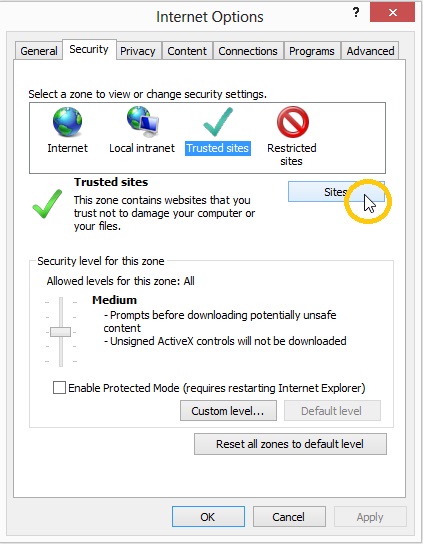
[wr_row width=”boxed” background=”none” solid_color_value=”#FFFFFF” solid_color_color=”#ffffff” gradient_color=”0% #FFFFFF,100% #000000″ gradient_direction=”vertical” repeat=”full” img_repeat=”full” autoplay=”yes” position=”center center” paralax=”no” border_width_value_=”0″ border_style=”solid” border_color=”#000″ div_padding_top=”10″ div_padding_bottom=”10″ div_padding_right=”10″ div_padding_left=”10″ ][wr_column span=”span12″ ][wr_text text_margin_top=”0″ text_margin_bottom=”0″ enable_dropcap=”no” appearing_animation=”0″ disabled_el=”no” ]Step 1: Go to Tools > Internet Options > Security > Trusted Sites > Click on Sites (Fig. 1).
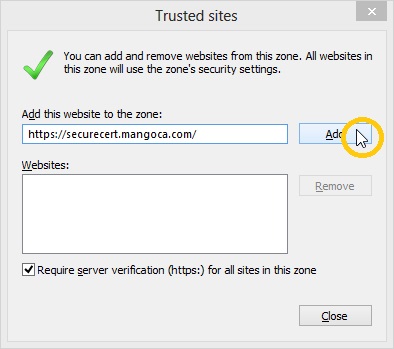
Step 2: Type https://securecert.mangoca.com in Box and then Press Add (Fig. 2).
Step 3: After Successful Adding the site URL will be visible Under Websites Area (Fig. 3).
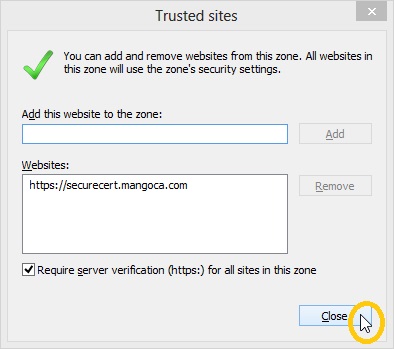
Step 4: Click Close to End this Operation.
[/wr_text][/wr_column][/wr_row]